 Devscape
 Designing a RAG system in a system design interview
RAG is a search problem with an AI hat on. How to cut up documents, how to search them properly, where the time really goes, and what one question costs — the parts interviewers now mark.
"Build something that answers questions about our company documents" is now a normal system design question. Most people who get it are not ready for it. They prepare for it as an AI question — embeddings, models, prompts — and lose the room in five minutes.
It is not an AI question. RAG means one simple thing: search your documents first, then let the model write the answer using what you found. It is a search system with a writing step at the end. Almost everything that goes wrong with it goes wrong in the search half.
Say that early and the rest of the hour is stuff you already know how to draw: a pipeline, an index, a read path, a cache, and a bill.
There are two paths, not one
They share the index and nothing else.
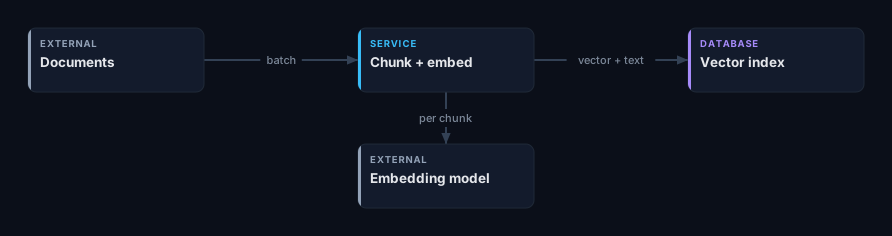
Getting documents in is a background job. Documents arrive, you cut them into pieces, you turn each piece into a vector, you save it. It runs on a schedule. It is allowed to be slow. It also decides how good every answer will be.
Answering a question happens live, while someone waits. A question comes in, you find the pieces that might answer it, you put them in a prompt, and you send the words back as they come.
Draw them as two rows. People who draw one big tangle spend the rest of the hour explaining which arrow is which.
Cutting documents up is the big decision
Everything after it depends on this, and it is the thing interviewers poke at when they want to know if you have really built one.
You cannot turn a 40-page document into one vector. The model squashes whatever you give it into a fixed list of numbers, so a long document ends up meaning everything and matching nothing. Single sentences are just as bad — a sentence on its own often makes no sense without the text around it.
What works is pieces of about 400 to 800 tokens, with a 10–15% overlap, cut at headings and paragraphs rather than at a fixed number of characters. The overlap is there because sometimes the sentence you need sits right on the line where you cut.
Save the text of each piece next to its vector, along with the document id, the heading it came from, and whatever you check permissions against. You will need all of it later, and going back to the original document while a user waits is an extra trip you do not need.
Say how big the index is
This is where quick sums pay off. A normal vector is 1,536 numbers, 4 bytes each — about 6 KB.
10M pieces × 6 KB        ≈  60 GB of vectors
× 1.5 for the search graph  ≈  90 GB in memory
Ninety gigabytes is one big machine, not a cluster. Say that out loud. Then name the lever: you can shrink the numbers from 4 bytes to 1 and the whole thing drops to about 15 GB, and you lose maybe one or two percent of accuracy. Almost everyone takes that deal.
One more number worth knowing. Redoing all 10 million pieces at ~500 tokens each is 5 billion tokens, which costs somewhere around a hundred dollars. That is useful, because it means you never need a clever plan for rebuilding the index. You just build a new one and switch.
The live path
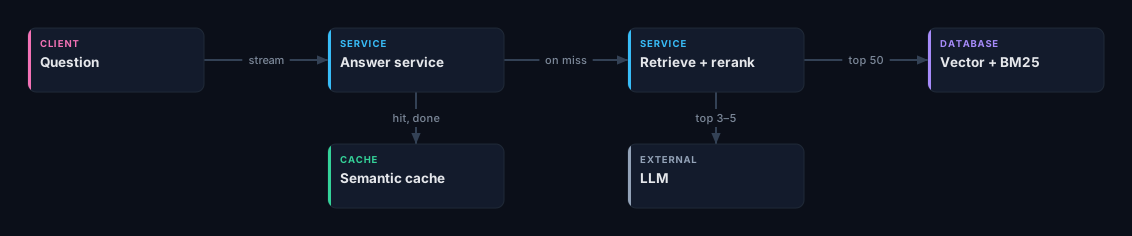
Grab a lot, then cut down. Pull about 50 possible pieces, score them again properly, and put the best 3 to 5 in the prompt. If you only ever pull the 5 you plan to use, you have handed the most important decision in the system to its cheapest part.
Use two kinds of search, not one. Vector search fails on exactly the things
people type most: error codes, product names, function names. ERR_CONN_4021
does not "mean" anything to a vector. Plain keyword search finds those instantly,
but it fails when someone asks the same thing in different words — which is where
vectors win. Run both and merge the results. Saying "I'd use both, and here's
why" takes five seconds and is worth a lot.
Score the results again. A reranker looks at the question and one piece together, instead of comparing two vectors that were made separately. It is much more accurate and far too slow to run over everything — but over 50 pieces it takes a few tens of milliseconds. After chunking, this is the biggest quality win you can get.
Check permissions during the search, not after. If someone may only see their own team's documents, that rule goes into the search. If you search first and filter after, you end up with nothing left, and with a system that behaves differently depending on whether someone remembered to filter. Leaking one team's documents to another is the kind of answer that ends a senior interview.
Where the time actually goes
| Step | Roughly |
|---|---|
| Turn the question into a vector | 20 ms |
| Search the index | 30 ms |
| Rescore 50 pieces | 80 ms |
| First word back from the model | 500–800 ms |
| Whole answer, 300 tokens | 3–6 s |
The search half is tiny. Every millisecond you save there is a millisecond nobody notices. People still spend ten minutes on it, because it is the part that feels new.
Do this instead: send words to the screen as they are written. Then what the user feels is the wait for the first word, not the whole answer. That one choice beats every search speed-up put together, and it changes your API — the answer comes back as a stream, and you have to send the sources first rather than stick them on the end.
Then work out what it costs
This part is genuinely new. Interviewers now expect a cost per question, and an answer without one sounds like it came from someone who has never paid a bill.
Take 2 million questions a day. Five pieces of 600 tokens is 3,000 tokens going in, plus a 300-token answer coming out:
in:    3,000 × $3 per million    = $0.009
out:     300 × $15 per million   = $0.0045
                                   ─────────
per question                     ≈ $0.0135
× 2M a day                       ≈ $27,000 a day
Ten million dollars a year — and all the search machinery you just spent the interview drawing is loose change next to it. Now the conversation gets interesting, because there are only four ways to cut it and you should name all four:
- Put fewer pieces in the prompt. Going from five to three cuts 40%, and a good reranker makes it almost free. This is why rescoring pays for itself twice.
- Send easy questions to a small model. Most questions are easy. Move up to the big model only when the search results look weak.
- Cache.
- Shorten your instructions. A 2,000-token block of instructions glued to the front of every request is a third of your input bill, paid two million times a day.
Caching, and how it bites
Caching on the exact wording of a question works, but it almost never hits — real people phrase things differently every time. A semantic cache turns the question into a vector and reuses an old answer when a past question was close enough. On a support site, 30–40% of questions hitting the cache is realistic, and every hit skips both the search and the model.
It is also the piece most likely to embarrass you.
Testing has to be part of the design
Every other system you prepare for tells you when it is broken: an error, a slow page, a growing queue. This one goes wrong quietly and confidently. A bad change to how you cut documents ships, and nothing lights up, because the answer is a nice-looking paragraph either way.
So the design includes a test set — a few hundred questions with the right answers, and the pieces that should have been found — and it runs automatically whenever you change the chunking, the model, the search, or the prompt. Three things are worth measuring:
- Did the search find the right piece at all? If it did not, nothing later can save you. This one needs no model to measure, which makes it the easiest and the most useful.
- Does the answer actually match what was found? Or did the model add things nobody wrote?
- Does it answer the question that was asked?
And save the ids of the pieces used for every answer. When someone reports a bad answer, the first question is "what did it read?" — and a system that cannot tell you is a system you cannot fix.
Say what happens when you find nothing
Sometimes the answer simply is not in the documents. What then?
The default — hand over whatever came back and let the model write something — is how you get a confident, well-written, completely made-up answer, pointing at documents that say no such thing. Plan for it: set a minimum score, and below it reply "I don't have anything on that" without calling the model at all. It is cheaper, it is faster, and it is what makes people trust the thing.
Bringing this up before you are asked is worth a lot. It shows you are building a product, not a pipeline.
Where people lose this question
Treating it as something brand new. It is an index, a read path, a cache and a background job. Use the words you already have — the interviewer wants to know whether your normal judgement still works here.
Fixing the wrong half. Ten minutes on search algorithms, and nothing on the step that takes half a second and costs $27,000 a day.
No cost number. This gets marked now. One line of sums is enough.
No plan for old data or permissions. Documents change and people move teams. Your index is a copy of your data, so every cache problem you already know about applies to it — including the one where the copy outlives the permission that allowed it.
Draw the two paths, say how big the index is, work out what one question costs, and name the three things that break silently. That is the whole answer, and none of it needed you to know how a model works inside.
The quickest way to find out if you can do it under pressure is to draw it and be marked: design a RAG question-answering service gives you the brief, the numbers, and the follow-up questions an interviewer would ask.
Now design it yourself
Draw the architecture on a board and have it graded against the things an interviewer pushes on. Free, and no account needed.
- Design a RAG question-answering serviceDesign a service that answers questions over a company’s own documents: a question arrives, the system finds the passages that answer it, and a language model writes the reply from those passages. Training a model is out of scope.10 checks
- Design an LLM inference APIDesign the serving system behind a large language model API: a request arrives with a prompt, and tokens stream back from a model running on a pool of GPUs. Training and fine-tuning are out of scope.9 checks
- Design search autocompleteDesign the suggestion box that completes a search query as someone types: the top ten completions for whatever prefix they have entered so far. Ranking the search results themselves is out of scope.8 checks